


1) Download 'TouchPal Keybaord' from the Play Store (Which is a Swipe Style Keyboard),
https://play.google.com/store/apps/deta ... artinputv5
TouchPal Arabic Pack
https://play.google.com/store/apps/deta ... age.arabic
install the Arabic Plugin (in other words Arabic Language) by going to TouchPal Settings or hold the [EN] button (which is located in the bottom left corner of the Kayboard - See Image 1 below, then select settings and continue from there). Then once you have done this, in the bottom left corner of this keyboard, you'll have the button [EN] (see image 1 below) touch this and it will change the language to Arabic with one touch, no need to change input methods or anything, just ONE touch - By far the easiest method.
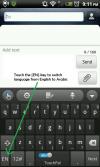
2) Download 'SwiftKey 3 Trial' (Only difference between this and the Pro version is that on the trial version every couple of days it'll tell you its a trial and buy the Pro version to avoid that message coming up - which in my opinion is no biggy). P.s. This is by far the best Keyboard for Android available in 'Play Store' (for typing English), see the video and you'll know what I mean.... Please be advised that it does have faces and light music/instrumental in the background.
https://play.google.com/store/apps/deta ... hone.trial
Install the Arabic Plugin (This keyboard also supports URDU and Farsi as well), then to switch language, On the space bar its has < English (UK) > pressing down on one side of the space bar and just slide across the space bar (see image 2 below) and it will show you the different languages available to you (depending if you only got Arabic or Urdu as well), then when the desired keyboard is more or less centered, you can type in that language.

3) Download 'Ibrahim Arabic Keyboard' from the Play Store:
https://play.google.com/store/apps/deta ... m.keyboard
Here's how to change the Language Input:
Older Android Phones: hold down on the text area and input method will come up, select the desired input method (in this case Ibrahim Keyboard)
Newer Android phones: just drag down the menu at the top where you will have an option to change input method (ensure 'Ibrahim Arabic Keyboard' is set to be on in the language and Keyboard settings) and then select it as an input method.
NOTE:
1) Which ever keyboard you decide to use, ensure that it is enabled in the 'Language and Keyboard' settings.
2) The older version of Android Phones will be able to type, but the Arabic will NOT come up joint as it should be.
Hope it helps....

